A production guide to Stripe-triggered email: event selection, signature verification, durable inbox and outbox tables, idempotency, ordering, dunning, templates, retries, testing, and observability.
Stripe can tell your application that a checkout completed, an invoice was paid, a payment failed, a trial is ending, or a subscription changed. Turning those facts into useful customer email looks simple: receive the webhook, switch on the event type, and call an email API.
That direct flow is fine for a prototype. In production, it hides the difficult parts. Stripe retries events. Two deliveries can arrive concurrently. Different events can describe the same business transition. Delivery order is not guaranteed. A payment-failed event can wait in a queue until after the customer has paid. An email provider can accept a request just before your connection times out. And returning success after swallowing an exception can permanently lose the only signal that should have created the message.
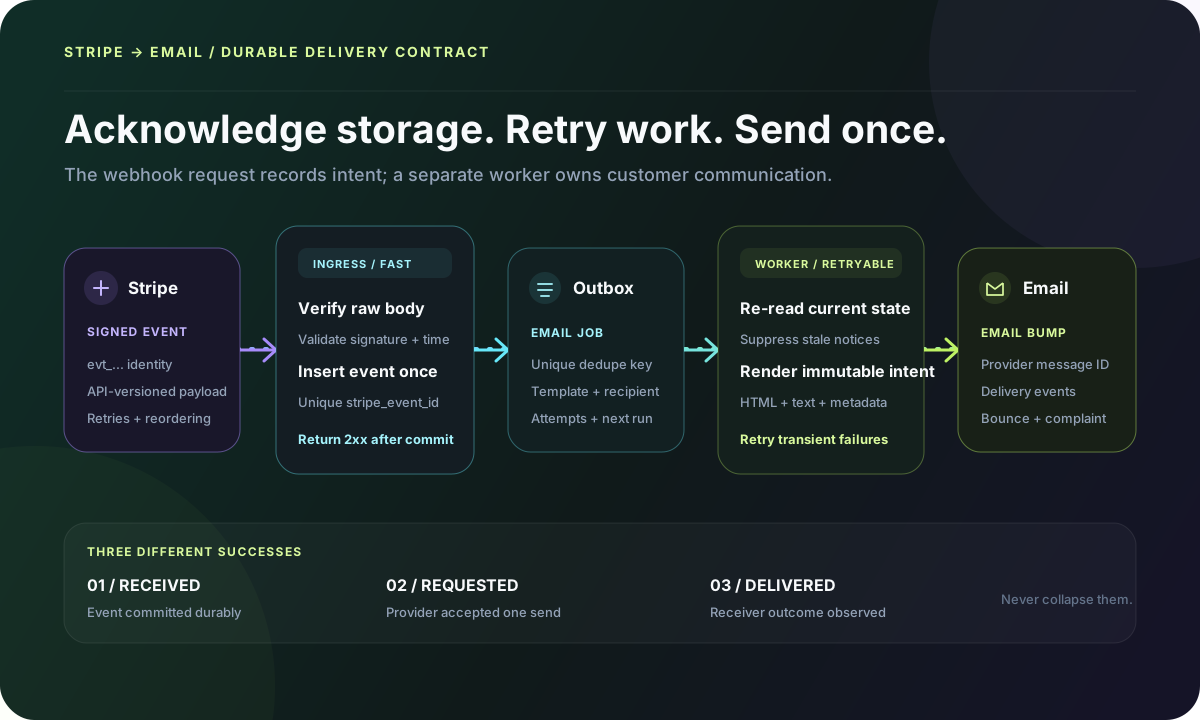
Start with three different meanings of success
A reliable design does not collapse webhook receipt, email submission, and mailbox delivery into one boolean. They happen in different systems and fail independently.
1. EVENT RECEIVED
Stripe signature verified and event committed to your database.

2. EMAIL REQUESTED
One eligible email intent was accepted by your email provider.

3. DELIVERY OBSERVED
The receiving system accepted, deferred, bounced, complained, or otherwise
reported an outcome through provider events.

A 2xx response to Stripe proves only boundary 1.
This distinction determines retries. If your database is unavailable and the event was not committed, return a failure so Stripe can retry. If the event was committed but the email provider is temporarily unavailable, return success to Stripe and retry the outbox job internally. If the provider accepted the message but it later bounced, do not replay the Stripe event; handle the delivery failure through the email event stream.
Decide which system owns each customer email
Stripe can already send successful-payment receipts, refund receipts, failed-payment notifications, trial reminders, renewal reminders, confirmation-required messages, and other Billing communications depending on your settings. Those messages use Stripe branding and hosted pages. A custom email platform gives you more control over product context, design, localization, stream separation, and lifecycle coordination.
Standard receipt with hosted invoice and payment recordsUseful when the built-in customer email meets the requirement and you want Stripe to own the billing artifact.
Your workspace is active—invite your teamUseful when the message depends on product provisioning, workspace state, roles, or application-specific next steps.
Payment failed: update billing, then resume your workflowUse one clear owner for the immediate billing notice and coordinate any longer recovery sequence so customers do not receive duplicates.
High-value annual renewal is past dueSome Stripe events should create an operator alert or support task rather than customer email.
Create a message-ownership table with one row per customer communication. Record the trigger, owner, recipient rule, template, stop condition, fallback, and evidence source. Review Stripe Customer emails, Revenue recovery, receipt, invoice, and Customer Portal settings beside your application workflows.
MESSAGE                 OWNER         TRIGGER / SOURCE            STOP OR SUPPRESS
Purchase receipt        Stripe        successful payment setting   custom receipt disabled
Workspace activated     application   paid + provisioned state     workspace already active
Payment failed          application   invoice.payment_failed       latest invoice is paid
Trial ending            Stripe        Billing email setting        custom trial flow disabled
Scheduled cancellation  application   subscription state change    cancellation reversed
Refund confirmation     Stripe        refund receipt setting       custom refund disabled
Plan changed            application   material price transition    same price and quantity
Choose events for business state, not for convenient names
A Stripe event says that something happened to a Stripe object. It does not automatically mean the customer should receive a specific email. Define the business transition first, then select the smallest event set that can prove it.
BUSINESS TRANSITION       PRIMARY EVENT(S)                         REQUIRED STATE CHECK
Checkout paid             checkout.session.completed               payment_status is not unpaid
Delayed checkout paid     checkout.session.async_payment_succeeded payment_status is paid
Subscription invoice paid invoice.paid                              invoice paid; subscription active
Invoice payment failed    invoice.payment_failed                    latest invoice still open/unpaid
Payment needs action      invoice.payment_action_required           action is still required
Trial ending              customer.subscription.trial_will_end      trial_end and payment method state
Cancellation scheduled    customer.subscription.updated             cancel_at_period_end changed true
Cancellation reversed     customer.subscription.updated             cancel_at_period_end changed false
Subscription ended        customer.subscription.deleted             final status and access policy
Plan or quantity changed  customer.subscription.updated             compare material fields only
Subscription paused       customer.subscription.paused              status really paused
Subscription resumed      customer.subscription.resumed             status really resumed
Refund created            refund.created                            amount, currency, payment, status
Refund failed/changed     refund.updated / refund.failed             latest refund status
For Checkout, completed does not always mean funds are available. Delayed payment methods can complete the checkout flow while payment is still processing; Stripe emits async success or failure later. Retrieve the Checkout Session and inspect payment status before provisioning or sending a paid confirmation.
For subscriptions, customer.subscription.created can describe an incomplete subscription that still requires payment or authentication. Stripe recommends invoice.paid as a reliable payment transition for provisioning when the subscription is active. Keep access control and email notification related, but do not make email delivery the gate that grants product access.
customer.subscription.updated is especially noisy. It can fire for renewals, coupons, discounts, metadata, quantities, cancellation scheduling, plan changes, and other updates. Do not send “your plan changed” whenever the event arrives. Compare previous attributes with current price IDs, quantities, status, and cancellation fields, then emit a named application transition.
Verify the signature against the untouched request body
Stripe signs each delivery in the Stripe-Signature header. Verification requires the exact UTF-8 body, the header, and the secret for that event destination. Parsing JSON before verification can change whitespace, key order, or encoding and invalidate the signature. Dashboard destinations, CLI forwarding, test mode, and live mode can have different endpoint secrets.
import Stripe from "stripe";
import { NextRequest, NextResponse } from "next/server";
import { db } from "@/db";

const stripe = new Stripe(process.env.STRIPE_SECRET_KEY!);

export async function POST(request: NextRequest) {
  const rawBody = await request.text();
  const signature = request.headers.get("stripe-signature");

  if (!signature) {
    return NextResponse.json({ error: "Missing signature" }, { status: 400 });
  }

  let event: Stripe.Event;
  try {
    event = stripe.webhooks.constructEvent(
      rawBody,
      signature,
      process.env.STRIPE_WEBHOOK_SECRET!
    );
  } catch {
    return NextResponse.json({ error: "Invalid signature" }, { status: 400 });
  }

  // One durable insert. A duplicate event id becomes a successful no-op.
  await db.query(
    `INSERT INTO stripe_webhook_events
       (event_id, event_type, object_id, api_version, livemode, payload)
     VALUES ($1, $2, $3, $4, $5, $6::jsonb)
     ON CONFLICT (event_id) DO NOTHING`,
    [
      event.id,
      event.type,
      event.data.object.id,
      event.api_version,
      event.livemode,
      rawBody,
    ]
  );

  return NextResponse.json({ received: true });
}
Return 400 for a missing or invalid signature. If the verified event cannot be stored durably, return a server error so Stripe retains responsibility for retrying delivery. Return 2xx after the insert commits, including when the event ID already exists. Do not catch a database or processing failure, log it, and return 200 unless another durable system already owns the work.
- Keep the route small and apply a request-body size limit.
- Use HTTPS in live mode and keep server time synchronized so signature-timestamp tolerance remains meaningful.
- Store event-destination secrets in a secret manager, not source control or logs.
- Roll signing secrets periodically and support Stripe’s overlap window during a rotation.
- Subscribe only to event types the integration handles.
- For Connect or organization destinations, retain account or context identity and use the correct account when retrieving objects.
Use a durable inbox and outbox
The webhook-events table is an inbox: it proves which Stripe deliveries your application accepted. The email-jobs table is an outbox: it proves which customer communications the application intended to request. Keeping both makes replay, recovery, and audit possible without asking Stripe to redeliver everything.
CREATE TABLE stripe_webhook_events (
  event_id        text PRIMARY KEY,
  event_type      text NOT NULL,
  object_id       text NOT NULL,
  api_version     text,
  livemode        boolean NOT NULL,
  payload         jsonb NOT NULL,
  received_at     timestamptz NOT NULL DEFAULT now(),
  state           text NOT NULL DEFAULT 'pending',
  attempts        integer NOT NULL DEFAULT 0,
  next_attempt_at timestamptz NOT NULL DEFAULT now(),
  last_error      text
);

CREATE TABLE email_outbox (
  id                  uuid PRIMARY KEY,
  dedupe_key          text NOT NULL UNIQUE,
  stripe_event_id     text NOT NULL REFERENCES stripe_webhook_events(event_id),
  template_key        text NOT NULL,
  template_version    text NOT NULL,
  recipient           text NOT NULL,
  variables           jsonb NOT NULL,
  state               text NOT NULL DEFAULT 'pending',
  attempts            integer NOT NULL DEFAULT 0,
  next_attempt_at     timestamptz NOT NULL DEFAULT now(),
  provider_message_id text,
  sent_at             timestamptz,
  last_error          text,
  created_at          timestamptz NOT NULL DEFAULT now()
);
Do not delete event IDs after an hour or a day merely because the normal retry window ended. Stripe supports automatic and manual retries on different timelines, and your own replay tools may operate later. Choose retention from audit, privacy, storage, and recovery requirements. If payload retention must be short, retain the minimum deduplication and outcome record longer.
Design idempotency at three layers
“Stripe sent the event twice” is only one duplicate mode. A production design needs separate identities for delivery, business intent, and provider submission.
DELIVERY IDENTITY
stripe_event_id = evt_...
Prevents processing the same Event object twice.

SEMANTIC IDENTITY
dedupe_key = "invoice.paid:" + invoice_id + ":receipt:v3"
Prevents two Event objects from creating the same intended message.

PROVIDER IDENTITY
provider_idempotency_key = email_outbox.id
Use when the provider supports request idempotency.

AUDIT IDENTITY
application_message_id = email_outbox.id
Carry through logs, provider metadata, and delivery webhooks.
Stripe notes that the same event ID can be delivered more than once and that separate Event objects can sometimes represent a duplicate. The event table handles the first case. A unique business key built from event type, object ID, message purpose, and template version handles the second.
The third case is harder: your email provider accepts a request, but the response disappears before your worker stores the provider message ID. Retrying can create a second email. If the provider offers an idempotency key, pass the outbox ID. If it does not, exactly-once external delivery is not achievable under every network failure. Keep the ambiguous job visible, reconcile provider activity, and decide whether a possible duplicate is safer than a possible omission for that message class.
Assume events arrive out of order
Stripe does not guarantee event delivery order. A worker can receive invoice.paid before customer.subscription.created, or process an earlier payment-failed event after a later successful payment. Event.created is useful evidence, not a license to blindly rewind your application.
WHEN PROCESSING invoice.payment_failed
1. Retrieve or read the latest canonical invoice state.
2. If invoice.paid is true, mark the failure notice suppressed_stale.
3. If payment action is required, choose the action-required template.
4. If a retry is scheduled, include the truthful retry date.
5. Deduplicate by invoice id + attempt count + message policy.

WHEN PROCESSING customer.subscription.updated
1. Compare only fields relevant to the customer message.
2. Ignore metadata, renewal, and non-material changes.
3. Separate scheduled cancellation from access-ended state.
4. Store the interpreted application transition before sending.
Fetching current state is not always the right answer. A receipt should preserve the amount, currency, line items, and payment facts of the paid invoice. A plan-change confirmation may need the before-and-after values captured by the event. Define whether each template needs event-time facts, current facts, or both, and snapshot those variables into the outbox so a retry renders the same message.
Resolve the recipient deliberately
Stripe objects can expose customer_email, customer_details.email, receipt_email, billing_details.email, or only a Customer ID. These fields do not always mean the same thing. Create one recipient resolver for each message purpose instead of adding a chain of fallbacks inside every switch case.
- Prefer the account owner or billing-contact identity stored by your application when the message is about the application account.
- Use the email associated with the payment artifact when the message is specifically a receipt.
- Retrieve the Stripe Customer only when the event payload does not contain the required data and the message still passes current-state checks.
- Do not treat a mutable billing email as an application login credential.
- For Connect, resolve the platform or connected-account customer in the correct account context.
- If no valid recipient exists, record a terminal skipped_no_recipient outcome rather than silently breaking.
Link to a stable application route, not a stale portal session
Failed-payment and subscription emails need a safe place to act. Stripe’s Customer Portal can let customers update payment methods, view invoices, change plans, or cancel. Portal sessions are temporary. Do not create one when queuing an email and assume the URL will still be valid when the recipient opens it.
EMAIL LINK
https://app.example.com/billing/action?intent=update-payment

ON CLICK
1. Require an authenticated application session.
2. Authorize access to the workspace or account.
3. Resolve the current Stripe customer id server-side.
4. Create a fresh Stripe Customer Portal session.
5. Redirect to the returned short-lived portal URL.

Never put a Stripe secret key, raw customer id, or authorization decision in the URL.
For recipients who cannot authenticate, use a purpose-built, signed, expiring application token with narrow scope and single-use or revocation controls. A random-looking customer ID is an identifier, not authorization.
Render money, dates, and dynamic content safely
Amounts are not always US dollars with two decimal places. Use the currency on the Stripe object and a locale-aware formatter. Keep integer minor units intact until formatting, account for zero-decimal currencies, and do not reconstruct invoice totals from one line item.
type PaymentFailedVariables = {
  customerName: string | null;
  amountDueMinor: number;
  currency: string;
  invoiceNumber: string | null;
  attemptCount: number;
  nextAttemptAt: string | null;
  billingActionUrl: string;
  supportUrl: string;
};

// Store normalized variables with the outbox job.
// Escape untrusted strings in HTML and include an authored text/plain part.
// Format money and dates at render time with an explicit locale and timezone.
Never interpolate Stripe metadata, product names, customer names, cancellation comments, or failure text into HTML without escaping. Treat webhook data as untrusted input even after signature verification: Stripe proves the sender of the event, not the safety of every string originally supplied through your application or a connected account.
Include a plain-text alternative that preserves the action, amount, dates, support path, and required disclosures. Keep the visible From name recognizable, use a verified aligned sending domain, and separate high-value product or billing mail from promotional campaigns when operational control justifies it.
Send through one provider adapter
The Stripe router should know message purpose and variables, not provider-specific request shapes. A provider adapter accepts a normalized message, submits it, and returns a normalized result. This keeps your event logic testable and makes migrations or failover less likely to duplicate business rules.
type OutboundMessage = {
  id: string;
  to: string;
  from: string;
  replyTo?: string;
  subject: string;
  html: string;
  text: string;
};

export async function sendWithEmailBump(message: OutboundMessage) {
  const response = await fetch("https://emailbump.com/api/v1/emails", {
    method: "POST",
    headers: {
      Authorization: "Bearer " + process.env.EMAIL_BUMP_API_KEY,
      "Content-Type": "application/json",
    },
    body: JSON.stringify({
      from: message.from,
      to: message.to,
      reply_to: message.replyTo,
      subject: message.subject,
      html: message.html,
      text: message.text,
    }),
  });

  if (!response.ok) {
    throw new Error("Email API returned " + response.status);
  }

  return await response.json();
}
Classify failures before retrying. Timeouts, connection errors, and many 5xx responses are transient. Authentication failures, invalid sender domains, rejected payloads, and malformed recipients usually need operator action. Apply exponential backoff with jitter, cap attempts, and move exhausted jobs to a visible dead-letter state.
Build dunning as a state machine, not one email per webhook
invoice.payment_failed can arrive for multiple attempts. Stripe Smart Retries can schedule future attempts, and the Invoice exposes attempt count and next payment attempt where applicable. Decide which attempts deserve an email and coordinate them with Stripe’s own failed-payment notifications.
PAYMENT FAILURE #1
Send a calm notice with amount, truthful reason category, and update path.
Do not threaten immediate cancellation if access continues.

PAYMENT FAILURE #2
Send only if the invoice remains unpaid. Include next retry when known.
Offer support for high-value or administratively complex accounts.

PAYMENT REQUIRES ACTION
Use the confirmation-required path, not a generic card-declined template.

INVOICE PAID
Stop every pending failure message for that invoice and record recovery.

FINAL UNPAID / SUBSCRIPTION ENDED
Apply the product access policy, then send the accurate final-state message.
A cancellation scheduled for period end is not the same as a subscription that has ended. Send a confirmation with the actual access-through date when cancel_at_period_end changes to true. If the customer reverses the cancellation, suppress the pending end reminder and confirm the new state if useful. Use customer.subscription.deleted for the terminal cancellation event according to your access policy.
Keep email failure separate from billing state
A bounced receipt does not mean the payment failed. A temporarily unavailable email provider does not mean the subscription should remain unprovisioned. The payment and product state machines must complete independently from customer communication, while still exposing an operator task when an important notice cannot be delivered.
Provision access and retry the receipt separatelyRecord communication failure without rolling back the paid invoice or customer entitlement.
Continue the truthful recovery policyDelivery proves only that the receiving system accepted the message, not that the customer updated payment.
Suppress the stale failure noticeRe-read invoice state and mark the pending job suppressed_stale with evidence.
Reconcile before blindly resending a high-impact noticeUse provider idempotency when available and preserve the application message identity.
Test transitions, duplication, and failure—not only event fixtures
The Stripe CLI can forward selected snapshot events to a local endpoint and prints a CLI-specific webhook secret. Triggered fixtures are useful for handler development, but they do not prove the full business flow. Also create real sandbox Checkout Sessions, subscription renewals, payment failures, portal changes, delayed payment scenarios, refunds, and cancellations.
# Forward only the snapshot events this endpoint handles
stripe listen \
  --events checkout.session.completed,checkout.session.async_payment_succeeded,invoice.paid,invoice.payment_failed,invoice.payment_action_required,customer.subscription.trial_will_end,customer.subscription.updated,customer.subscription.deleted,refund.created,refund.updated,refund.failed \
  --forward-to localhost:3000/api/webhooks/stripe

# Trigger a representative fixture
stripe trigger invoice.payment_failed

# Resend a real event to a registered endpoint during recovery
stripe events resend evt_123 --webhook-endpoint=we_123- Deliver the same event twice sequentially and concurrently; assert one inbox row and one email intent.
- Create two separate events that map to the same message purpose; assert the semantic dedupe key wins.
- Process payment failed after invoice paid; assert the stale failure email is suppressed.
- Fail the database insert; assert the webhook returns a non-2xx response.
- Fail the provider request before acceptance; assert the outbox retries.
- Simulate an ambiguous provider timeout; assert the job becomes reconcilable rather than invisible.
- Rotate the webhook secret with overlap and verify both active signatures.
- Test an event created under the pinned webhook API version before upgrading the endpoint.
- Render long names, zero-decimal currencies, missing optional fields, localization, and right-to-left content.
- Inspect final HTML, plain text, links, headers, authentication, mobile rendering, and delivered provider events.
Make replay an operator feature
When an outage ends, you need more than “resend all failed Stripe events.” Build an operator view that can filter inbox events and outbox jobs by event type, object, customer, account context, state, attempt, and time. Reprocessing an event should reuse the same dedupe rules and produce an audit record.
STRIPE EVENT
pending → processing → processed
                   ↘ retry_wait → processing
                   ↘ dead_letter

EMAIL OUTBOX
pending → sending → sent
                ↘ retry_wait → sending
                ↘ ambiguous → reconciled_sent | retry_approved
                ↘ suppressed_stale
                ↘ skipped_no_recipient
                ↘ dead_letter

Never use a generic "done" state for both event interpretation and email delivery.
Stripe automatically retries live webhook deliveries for up to three days with backoff, and manual resend paths have their own availability windows. A manual resend does not automatically cancel an already scheduled automatic retry. Returning success for an event your database has already processed makes the duplicate a safe no-op.
Instrument the complete chain
Logs should answer whether Stripe sent the event, your endpoint verified it, the database committed it, a worker interpreted it, an email job was created or suppressed, the provider accepted it, and the receiving system reported an outcome. Use stable identifiers rather than searching raw email addresses.
stripe_event_id · stripe_event_type · stripe_object_id
stripe_account_or_context · livemode · webhook_api_version
webhook_received_at · verified_at · inbox_state · inbox_attempts
application_transition · email_outbox_id · dedupe_key
template_key · template_version · recipient_internal_id
provider_message_id · provider_status · provider_attempts
sent_at · delivered_at · bounced_at · complaint_at
suppression_reason · last_error_class · correlation_trace_id- Alert on signature failures without logging secrets or complete sensitive payloads.
- Alert on webhook verification-to-commit latency and non-2xx response rate.
- Track pending age, retry volume, dead letters, and ambiguous provider attempts.
- Measure event-to-email-request and event-to-delivery latency by message purpose.
- Reconcile Stripe business objects with application state and email intent counts.
- Monitor bounces and complaints independently from Stripe payment outcomes.
- Protect payload access because billing events can contain personal and commercial data.
Pin and rehearse webhook API upgrades
The event destination’s API version controls the structure of snapshot Event objects delivered to it. Pin the version your code expects, store the version with each event, and test upgrades with a parallel endpoint or Stripe’s recommended migration process. Updating an SDK without reviewing the endpoint version can create subtle deserialization and field-shape failures.
Stripe also supports thin events for some event destinations and resource families. Thin handlers retrieve the related object rather than relying on a complete snapshot. Do not mix snapshot and thin assumptions in one parser. Document which event model, API release, account context, and retrieval behavior each endpoint uses.
Production launch checklist
- Define message ownership across Stripe customer emails and custom workflows.
- Subscribe only to the Stripe events required by named business transitions.
- Pin the webhook endpoint API version and match the integration code.
- Verify signatures against the raw body with the correct endpoint secret.
- Commit events durably before returning 2xx; return failure when storage fails.
- Use a persistent event inbox and email outbox with explicit state and attempts.
- Deduplicate event IDs and semantic message purposes separately.
- Use provider request idempotency where supported and expose ambiguous outcomes.
- Assume out-of-order delivery and recheck current state before time-sensitive notices.
- Snapshot event-time variables needed for immutable receipts and confirmations.
- Resolve recipients by message purpose and account authorization.
- Use a stable authenticated application billing route that creates fresh portal sessions.
- Escape dynamic HTML and author a useful text/plain alternative.
- Coordinate dunning attempts with Smart Retries and stop messages immediately after recovery.
- Keep billing, product provisioning, and email state machines independent.
- Test duplicate, concurrent, reordered, delayed-payment, retry, and outage scenarios.
- Monitor inbox age, outbox age, dead letters, provider outcomes, bounces, and complaints.
- Build safe replay and reconciliation tools before the first incident.